
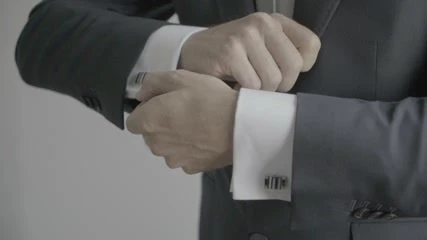
 5.9s
00041.MTS90/100
Groom adjusting his shirt sleeve.
For wedding videographers and editors
We love editing weddings and creating stories that move people, but the reality is that we spend hours cleaning up shots, hunting for the right frame and the perfect moment. And by the time you finally finish, you're burned out. And on top of that the bride sends you a WhatsApp saying: Hi, how's my wedding video coming along? 🥰12:41 ✓✓


What is Weddable?
weddable analyzes, trims and cleans hours of raw footage from a wedding right on your computer. It scores every shot, rescues that perfect take and discards the photographer who walked into the middle of your frame; it recognizes the main people and the key moments of the day, and hands you a timeline ready to open in your editor.
Noted: Weddable will learn from this change.
How it works
Drag in the folders from each camera. Weddable reads the originals without touching them.
Smart Video AI reviews every clip without you having to be there.
Create Highlights to the beat of the music, or build a full film with every moment of the day.
Weddable doesn't deliver a finished video: it does the tedious work so you can add the final touch in your editing software.
Ready to open in your editor
Analysis · Smart Video AI
Each shot gets a score based on its focus, exposure and stability, and goes straight to Keepers or Rejects.
Disagree? You rescue a reject with one click and Weddable learns your taste for next time.
5.9sGroom adjusting his shirt sleeve.
 0.9s
Pre-analysis: rejected (too shaky)
 4.1sGroom prep
Math analysis: steady, in-focus stretch
 0.8s
Pre-analysis: rejected (blurry)
It recognizes faces and groups each person. You give them a name and find all their shots.
Type what you want and the shots from that moment appear.
The AI looks at every frame and recognizes what's happening. The most detailed.
Math discards the bad footage and the AI only looks at what's usable.
Nothing to install. The fastest, and it works on any computer.
Editing
Getting ready, ceremony, reception or dance. Weddable understands what happens in each shot and organizes the shoot by moments automatically, and lets you create your own blocks to measure.
Forget about filling the timeline with markers by hand. Weddable reads your song's pulse and builds the sequence, cutting and always choosing the best shots and never repeating a shot.
Assign to each moment its own song, your recorder's audio or the ambient sound. Does the song run longer than the block? Weddable does a clean fade and picks it back up later exactly where it left off so no track goes to waste.
Editing assistant
| # | Block | Sound |
|---|---|---|
| 1 | Prep | Song 1 |
| 2 | Ceremony | Recorder |
| 3 | Dance | Song 2 |
| 4 | Rings | Original sound |
Works offline, inside your computer.
Sound and cameras
Weddable compares the audio waveforms and aligns your cameras' clocks to the millisecond, automatically.
Sync your external recorder with the video automatically. The vows, the speeches… everything syncs on your timeline without doing it by hand.
Cameras B and C are arranged on secondary tracks, exactly where they belong, and you just press a button to switch cameras on the fly.
Deliver
For Premiere Pro, DaVinci Resolve and Final Cut Pro, with the cuts, the music and the audio all in place and organized.
Ideal if you want to quickly show the couple a sneak peek.
If you move the files to another drive, Weddable warns you and finds them again.
Videos are not uploaded anywhere. The AI also runs on your computer, and there is no telemetry: we don't know what you shoot or how you edit it.
Who it's for
You shoot and edit alone. Weddable saves you hours of review on every wedding.
Sync the cameras, organize the footage and give your editors the same starting point.
You don't have a method yet for so much footage. Weddable guides you step by step.
Pricing
Your first wedding is on us: 10 hours of analysis with everything unlocked and no card. Then you choose how to continue.
All prices are excluding VAT: VAT is added at checkout. A wedding is about 10 hours of footage. Hours are only spent the first time each video is analyzed: re-editing or exporting costs nothing. Secure payment with Stripe and a 14-day refund if you're not convinced.
| Comparison | Free (no plan) | Trial, License or Season |
|---|---|---|
| Clips per project | 10 | Unlimited (uses hours) |
| Recording types | Weddings and vlogs | All |
| Export to | Premiere | Premiere, Final Cut and DaVinci |
| Export length | Up to 5 min | Unlimited |
| Pre-edit, sync and silences | No export | Exportable |
| LUTs and marker per clip | No | Yes |
FAQ
Windows 10 or 11 (FFmpeg is included). The AI flies with an NVIDIA graphics card and 8 GB of RAM. But you can use the math-only model, which runs on any computer and already cleans, scores and groups the raw footage for you.
Not to start cleaning. When you want it to recognize faces and moments, the assistant downloads with one click the artificial intelligence that works in the background on your own computer.
We would never do that, we trust your artistic judgment as much as the couple does. Weddable saves you the day of sorting and gives you the first cut to the rhythm of the music so you can bring all your artistic judgment to your work in Premiere Pro, Final Cut Pro or DaVinci Resolve.
Yes. It syncs the clocks, even if the cameras are out of step, matches the recorder's clean audio and leaves the cameras on separate tracks ready to cut.
Yes. It generates a lightweight copy (proxy) automatically so you can move around the timeline without a single stutter.
Never. Weddable reads your raw footage directly from your disk without touching it and saves the project separately. Your weddings never leave your editing room.
You're in charge of every shot. Nothing is deleted: you rescue any take with one click, trim or reorder to your taste, and Weddable learns from your eye.
If you turn it on, it groups faces by person so you can find the couple or the wedding party instantly. Everything happens on your PC and never leaves your project.
Only the first time you analyze new raw footage, based on how long it is. Reordering, trying another song, changing the rhythm or exporting XML is free. The counter always tells you how many you have left.
Click the plan next to the logo and hit "Link with my email". You sign in on the web with your email, enter the code and that's it: your hours show up instantly.
Only to link and to buy. To edit, no: it works offline with your last balance and will deduct what you analyzed when you're back online.
Your hours don't expire: they're kept for when you return or buy the License. And if you go from Season to License, we credit what you already paid.
Yes, during the 14 days after purchase if you find it doesn't save your life. The rest of the details are in the terms of sale.
For Windows 10 and 11
It installs in a minute. Link your email and your first wedding is on us.
Coming very soonSee your hours, buy bundles, manage your subscription and your linked computers.